Hello Ruby Users! I’d like to introduce my pet project: kredki. It’s a gem for playing with vector graphics and creating simple applications. It’s almost completely untested, full of bugs, and the documentation is sparse, but I’m proud of it. Especially since it’s 100% the result of using Natural Intelligence If you’d like to check it out, you can download it from RubyGems or visit my GitHub repository. Any feedback would be greatly appreciated!
Note: kredki currently doesn’t work on macOS. I plan to fix this as soon as I have access to the necessary hardware, or if someone else helps me with it.
Basically, the mini apps that are in kradki/sample are all that I have created using it so far I wanted to get to a point where the gem was relatively complete. Now I’m wondering what to do next with it.
To run on Mac, you probably just need to generate the appropriate shared libraries and set the gem to use them. There are 3 shared libraries used in the project: SDL, ThorVG and pastele.
With SDL, things should be simple - you clone the repository and run make or similar.
In the case of ThorVG, it’s a bit different, as meson and ninja are used for compilation. Furthermore, kredki doesn’t use the original version of ThorVG, only the one available here (please, clone thorvg-gui branch, as main is used only to keep fork synchronized). I added a function for text measurements there, which is essential for the gui library.
And the final shared library: pastele. This is the glue layer that connects SDL and ThorVG from kredki. It’s part of the kredki project on GitHub, so you don’t need to clone anything additionally. You can compile it using make, but you’ll need to prepare a dedicated CMakeLists.txt first.
For Windows and Linux, there are rake tasks that automate the entire process. You can take a look at Rakefile and see how it’s done there. I also wrote several points about it in the readme.
If you try to do this and need advice, you can always write here or private message me.
I took a quick look and was able to setup the dependencies using the following commands:
brew install sdl and brew install thorvg and make seems to come out of the box:
$ brew list sdl
Warning: Formula sdl was renamed to sdl12-compat.
/usr/local/Cellar/sdl12-compat/1.2.76/bin/sdl-config
/usr/local/Cellar/sdl12-compat/1.2.76/include/SDL/ (33 files)
/usr/local/Cellar/sdl12-compat/1.2.76/lib/libSDL-1.2.0.dylib
/usr/local/Cellar/sdl12-compat/1.2.76/lib/pkgconfig/ (2 files)
/usr/local/Cellar/sdl12-compat/1.2.76/lib/ (2 other files)
/usr/local/Cellar/sdl12-compat/1.2.76/sbom.spdx.json
/usr/local/Cellar/sdl12-compat/1.2.76/share/aclocal/sdl.m4
$ make -v
GNU Make 3.81
Copyright (C) 2006 Free Software Foundation, Inc.
This is free software; see the source for copying conditions.
There is NO warranty; not even for MERCHANTABILITY or FITNESS FOR A
PARTICULAR PURPOSE.
This program built for i386-apple-darwin11.3.0
Does that helps you to generate the template for building in macOS? I could try running it but making code updates to the build process would be out of my depth.
Ok, I see brew install sdl gives us sdl12-compat, which uses SDL2. We need SDL3, so you could try brew install sdl3 instead. There is only one more thing. pastele needs SDL headers files during compilation. If it is a different header version than the one with which the shared library was compiled, it may not work. But let’s assume it will work
Official ThorVG package isn’t the one we need. But its compilation shouldn’t be problematic. Try this:
brew install meson
brew install ninja
# cd to path of destination
git clone https://github.com/lpogic/thorvg.git -b thorvg-gui
cd thorvg
meson setup builddir -Dengines=cpu -Dloaders=all -Dsavers=all -Dsimd=false -Dlog=false -Dstrip=false -Dthreads=false -Dtests=false -Dpartial=false
ninia -C builddir
Great! The ThorVG compilation output looks good. You could run the tests with ninja -C test, but we specified -Dtests=false in the meson configuration, so that won’t work now. We can go back to this step if something goes wrong later.
So now let’s try build the pastele:
Confirm you have rake installed.
I’ve added a path for macOS to the kredki repository. Clone it or pull the latest changes if you’ve already done so.
Go to the root kredki project directory.
Run rake config. This will create rake-config.rb file. Open it for editing.
Change the "/home/user/SDL" string to "/usr/local/Cellar/sdl3/3.4.4".
Change the "/home/user/thorvg" string to path to the thorvg project (builddir should be one of the child directories of it).
Save changes.
Run rake build. This task consists of several steps: preparing CMakeLists.txt, compiling pastels, generating a binding file, copying shared libraries to the project.
Run rake. If you see a green window with two buttons, we are home
 If you’d like to check it out, you can download it from RubyGems or visit my GitHub repository. Any feedback would be greatly appreciated!
 I wanted to get to a point where the gem was relatively complete. Now I’m wondering what to do next with it.
 . Let me know if I need to run anything to verify the ThorVG installation too.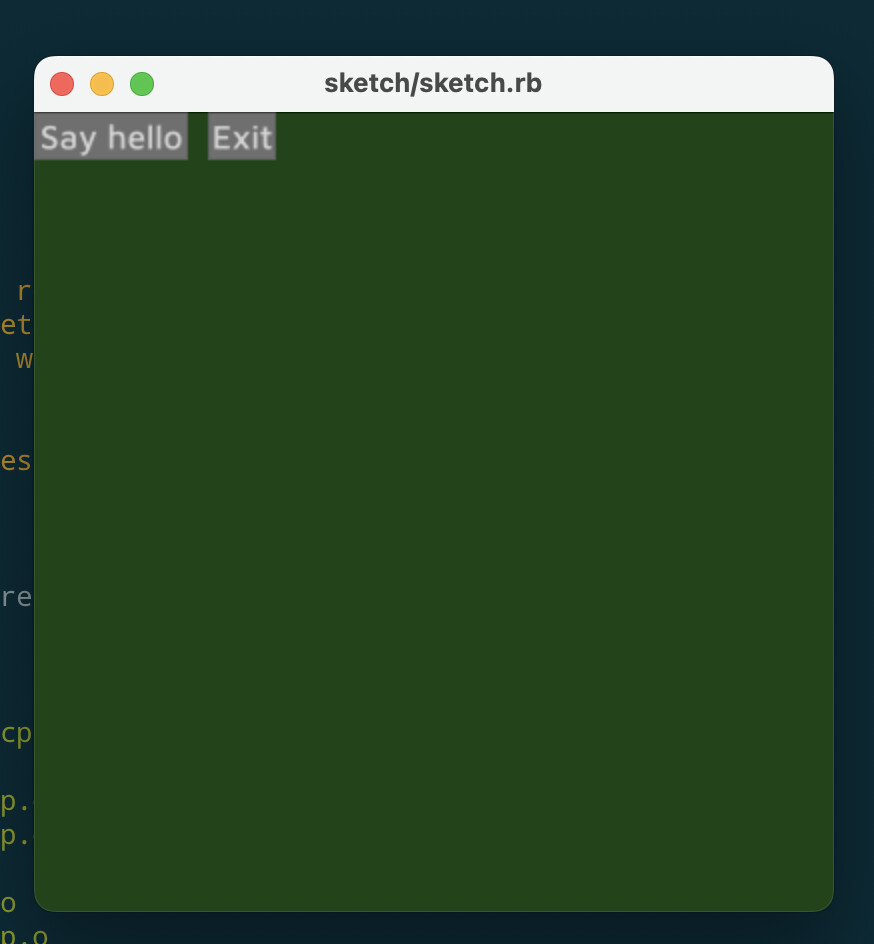
 I merged your PR. Thanks!